DAW integration
Patch selection, in the DAW.
Each project remembers which patch every device is on, and recalls it when the session opens. To change sound, double-click a patch or press Recall: the Program Change goes out.
Your hardware's patches, controlled from your DAW.
An audio effect for your DAW that recalls and organises the patches already on your MIDI hardware. Free, in open beta.
AU · VST3 · macOS 11 or later · Hardware that answers Program Change

Each project remembers which patch every device is on, and recalls it when the session opens.
The names and numbering you know from the front panel, not MIDI program 0 to 127.
Turn a control and it's recorded on a lane, on screen or on the unit.

One click backs up the unit's memory, and one click sends it back.

Ready-made templates for 55 synths and effects units. Anything else that answers a Program Change works too.
Compatibility matrixDAW integration
Each project remembers which patch every device is on, and recalls it when the session opens. To change sound, double-click a patch or press Recall: the Program Change goes out.

Edit sounds
The Patch tab lists your unit's sound controls. Drag one and the change goes out over MIDI. Press A and it's on a DAW lane, recorded as you turn it, on screen or on the unit. How it works.
Patch information
An Eclipse shows 451 Kaizeeer. A PCM70 shows P1.4 Vox Plate. The names and numbering you already know from the front panel, not MIDI program 0 to 127.

Performance
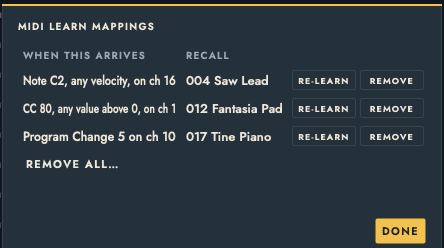
MIDI Learn maps a pedal, a pad or a button to a patch. Press Learn, touch the controller, done. Or automate favourites and scenes on the DAW's timeline.
Organisation
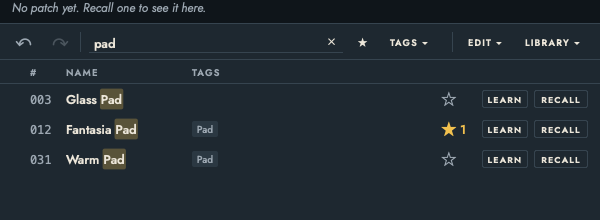
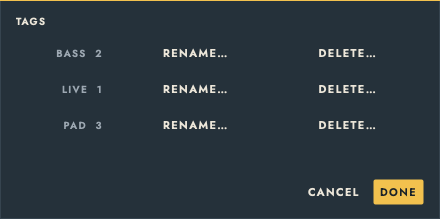
Type pad, get the pads. Star the keepers. Filter by tag.
Backup & restore
On devices that support it, Patchmark tells you what to press on the unit, catches the dump and keeps it as a file. If the device ever loses its memory, one click sends it back.
Rack view
The rack shows every Patchmark in the project as a unit, with the patch each device is on and its MIDI coming and going. Double-click a unit to work on that device right there, without looking for its track.

Compatibility
Ready-made templates for a growing set of synths and effects units (compatibility matrix). For anything else that answers a Program Change, duplicate Generic and fill in the banks.
Tested on our own hardware: each feature's status
Do you have any of the other units? Help us test it
Have hardware?
Patchmark is free and in beta for macOS.
Install it, then activate it with your email.