Manual contents
For version 0.9.9 · beta · Change
Importing patch names
Fill the bank's names from a file: a list typed by hand, one copied from your hardware's manual, or a bank exported by Patchmark. Only the names change; favourite stars and tags stay as they are. With a template that has several banks (the JV-1080: User, Preset A–D), the names go into the bank of the patch you selected, up to that bank's last patch, and Undo puts back that bank's names even if you've moved on to another bank by then.
What the file can be
-
A text file, one name per line. Line 1 names the first patch you import into, line 2 the next, and so on. Spaces around a name are dropped. An empty line leaves that patch's name as it is, so you can skip patches and keep the list lined up with your hardware. Nothing is read out of a line as a number: "808 Kick" is a name. Text saved as UTF-8 (what most editors use) or UTF-16 both work, with any kind of line ends.
-
A bank exported by Patchmark (a
.jsonfile from Library ▾ ▸ Export bank…, see Exporting and importing the bank). Its names are imported in order; its stars and tags are not. A patch that was never named in that bank (still "Patch 002") is treated like an empty line: the patch it lands on keeps its name. -
A Nord Sound Manager export (a Nord Stage 3, or another Nord whose template numbers its programs the way the unit does). Each name goes to its own program, "A:11" to A:11, in whichever bank holds it, so nothing is imported in list order. See From a Nord Sound Manager export.
Import names
- Choose Edit ▾ ▸ Import names… and pick the file. The plugin keeps running while the file chooser is open.
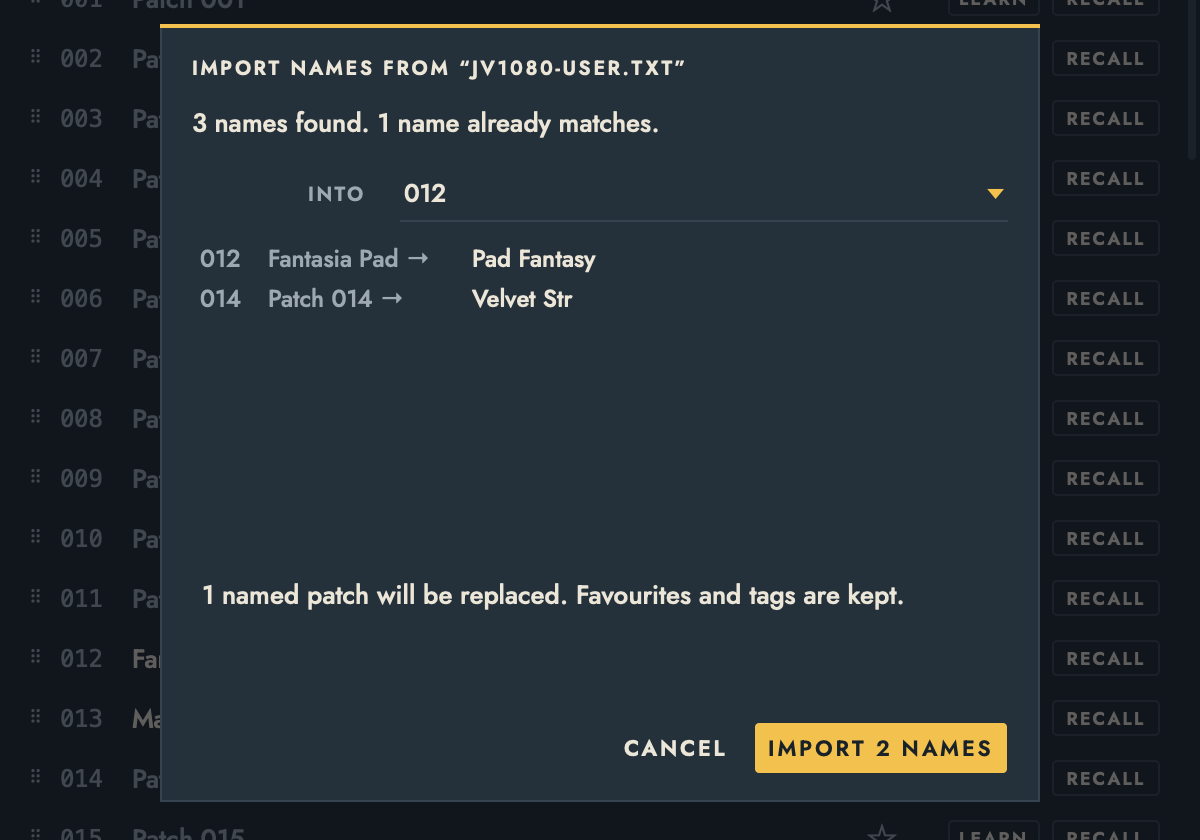
- A preview lists every name that would change before anything changes:
- Into sets the first patch to fill (001 unless you change it). With several banks it names the bank first, "Preset B · 001", which matters when every bank is shown in one list.
- Each line shows the patch, its current name and the new one ("012 Fantasia Pad → Pad Fantasy"). Names that are already the same aren't listed, only counted ("12 names already match").
- Below the list: how many patches that you named yourself will get a new name (patches still called "Patch 014" don't count), and how many names are skipped: those that don't fit after the last patch, and those that would land on a patch the template leaves out.
- Click Import N names, where N counts only the names that change, or Cancel (or Esc) to change nothing. If every name already matches, a message says so instead of the preview, with OK alone.
- A green message confirms "Imported N names". Its Undo button, like Undo or ⌘Z, puts every name back in one step (see Undo and Redo).
Names go only into the patches your device template shows: with the DX7 template, patches 001–032.
From a Nord Sound Manager export
A Nord can't send its program names over MIDI, so after you rename programs on the unit Patchmark still shows the names it had. Nord Sound Manager, Nord's free app that connects to the unit over USB, can give them to you:
- Connect the unit to the computer with USB and open Nord Sound Manager.
- Choose File ▸ Export Sound Lists…. Sound Manager saves several web pages (
.htmlfiles), one for each kind of sound. The programs are in the one named after the unit and "Program", for example "Nord Stage 3 Program 2026-11-06.html". - In Patchmark, choose Edit ▾ ▸ Import names… and pick that file.
Patchmark also reads the files a community converter makes from a Sound Manager backup (shared on the Nord
User Forum): one .csv file per program. Pick the folder that holds them, its subfolders included, or
the .zip they came in. The chooser takes a folder or a .zip archive as well as a file.
The preview works as for any list, with three differences:
- There's no Into row. A line says "A Nord Sound Manager export: each name goes to its own program", and each row shows the program's own number: "A:23 B3 Full → Hold On B3".
- Only programs are imported. Rows or files of another kind (a Synth preset, a Song) are counted under the list: "2 files skipped: not program exports (Song, Synth)." So is a program whose number the template doesn't have.
- The names are yours, like a typed list: Patchmark doesn't take them as what the unit holds now, because the export may be older than the unit.
If none of the programs in the export has a number the template has, a message says so, with OK alone: "None of these names fits the Nord Stage 3. The 400 programs in this export are numbered A-01-1 to H-20-5, which this template doesn't have." That's an export from another model (here a Stage 2): choose that model's template, or export again from this unit.
When a file can't be imported
The plugin refuses the file, says why, and changes nothing:
- "It isn't a name list the plugin can read." The file isn't text (a PDF or a picture, say), has no names in it, or is far too large to be a list of names. Choose a text file with one name per line, or a bank exported by Patchmark.
- "It isn't a Nord Sound Manager export the plugin can read." The folder,
.ziparchive or.htmlfile holds no program: no Sound Manager list and no program.csvfiles. Choose Sound Manager's list, or the folder or.zipof program files. - "It was saved by a newer version of Patchmark." A bank file from a newer build of the plugin. Update the plugin, then try again.
This manual is for version 0.9.9.