Manual contents
For version 0.9.9 · beta · Change
SysEx backup and restore
Your hardware keeps its patches in its own memory. A backup saves that memory as a standard SysEx (.syx)
file, from a dump the hardware sends: you can restore it later with
Patchmark or any other SysEx tool. A restore sends a backup back to the hardware, replacing what its memory
holds. Where the manufacturer documents it, a backup also gives the patch list the names stored
on the hardware.
Backing up
- Make sure the hardware's MIDI out is connected to the Input chosen in Device ▾ (see Choosing the MIDI input); the backup arrives there.
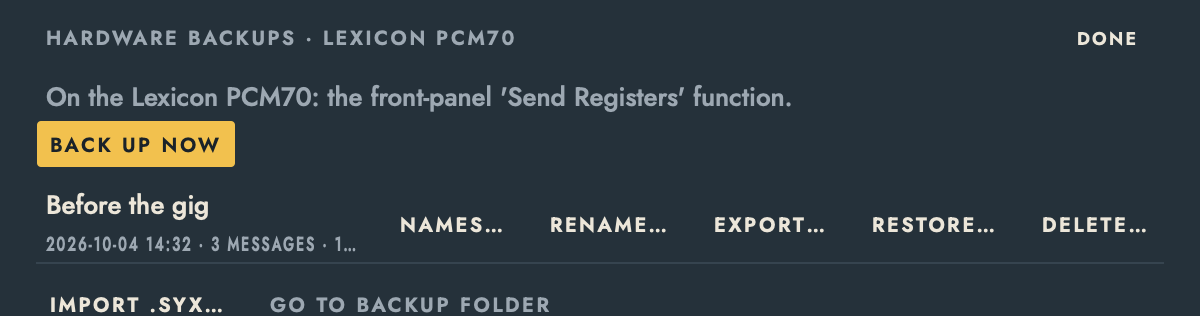
- Choose Library ▸ Hardware backups…. The device setup sheet shows the device's backups, and what to press on the hardware to start a dump, for example On the Lexicon PCM70: the front-panel 'Send Registers' function.
- Click Back up now. Patchmark waits: Waiting for the Lexicon PCM70: start the dump on it now.
- Start the dump on the hardware. Patchmark shows it arriving: Receiving 41.0 KB · 120 messages…. Cancel stops it and keeps nothing. If the dump stops partway, Patchmark says how far it got and keeps nothing.
- When the hardware has been quiet for 3 seconds, the backup is saved: Backup saved: 120 messages · 41.0 KB, and the backup appears at the top of the list.
- Name this backup opens with your Device's name selected: type a name and press Return. Esc keeps the proposed name.
A Yamaha Motif needs nothing pressed: choose All User banks or One bank, then Back up now, and Patchmark asks it for each User voice. A restore puts each back in place.
An Eventide H3000 is asked for its user programs when you click Back up now, with the Output chosen in Device ▾ and the unit's device number at 0, its factory setting. If nothing arrives, press FUNCTION five times, Dumps, then Dump Pre on the unit.
If nothing arrives within 30 seconds, Patchmark says so: check that the hardware sends SysEx to the chosen input. Try again waits again.
If the dump doesn't look like the hardware's, for example a message of the wrong size, the backup fails, says which message and why, and keeps nothing. Patchmark checks a dump as far as the hardware's manual allows: the manufacturer's SysEx ID and, where the manual gives them, how each message starts and how long it is. None of these manuals documents a checksum Patchmark could compute, so a damaged dump of the right size may go undetected. The Eventide Eclipse's manual suggests recording a backup twice and comparing the sizes.
A dump too large to receive (more than 4 MB) fails the backup rather than saving part of it: Part of the dump from the … was lost: more than 4 MB arrived at once. Nothing was saved. A message that arrives cut short says which: Message 6 from the Novation Peak arrived damaged: it is 307 bytes, not 527. Nothing was saved. Choose Try again and send the dump again from the hardware.
If Device setup changes during a backup (another device or another MIDI input, for example when your DAW reopens the project), the backup stops and keeps nothing: Device setup changed during the backup. Nothing was saved. Back up again once it's set up as you want.
Restoring
A restore sends a stored backup back to the hardware, exactly as it was received. It overwrites what the hardware's memory holds now, and the hardware can't undo it.
- Make sure the hardware's MIDI in is connected to the Output chosen in Device ▾, and that the hardware accepts SysEx (the settings in the table below).
- In Library ▸ Hardware backups…, click Restore… on the backup.
- Patchmark asks first, for example Restore “Before the gig” to the Lexicon PCM70? Click Restore to go ahead. If you might need what the hardware holds now, click Back up first instead: it starts a backup, and nothing is sent.
- Patchmark sends the backup a message at a time and shows how far it is, for example Sending 343 bytes of 1.0 KB · 1 of 3 messages. It waits after each message at least as long as a MIDI cable takes to carry it, and longer where the hardware's manual asks (the Lexicon PCM70 asks for 30 ms between registers).
- When the last message is sent, a green message confirms it, for example Sent “Before the gig” to the Lexicon PCM70: 3 messages · 1.0 KB.
Cancel stops the restore before the next message. What was already sent stays on the hardware. Patchmark says how much was sent, for example Restore cancelled: 1 of 3 messages (343 bytes) were sent, so the Lexicon PCM70 holds a partial restore. Run the whole restore again to bring the hardware fully back to the backup.
If the restore stops, for example because the hardware was disconnected, a dialog says why and how much was sent. Without an output to send to, Restore… says to choose one in Device setup. A restore also stops, before its next message, if Device setup changes to another device or output while it runs: it never sends the rest of a backup somewhere else.
Patchmark sends the backup, but can't check that the hardware stored it: after restoring, check a few patches on the hardware.
Restore is off for the Eventide Eclipse in the beta.
Reading patch names from a backup
Where the manufacturer documents where a dump keeps the patch names, Patchmark can read them into the patch list.
- Back up the hardware (see Backing up), or use a backup you already have.
- In Library ▸ Hardware backups…, click Names… on the backup.
- Patchmark shows the names it found, patch by patch, as Edit ▸ Import names… does: each patch's number, the name it has now and the name from the backup, and how many names you gave yourself would be replaced. Each name goes to the patch the dump says, so the start can't be moved. On hardware with several banks it also says which banks the names go into: 512 names found for banks A, B, C and D.
- Click Import to rename them. Favourites and tags are kept. A backup of several banks names each bank it holds, whether Use banks is on or off, and whichever bank the list shows. It is one step: Undo takes every name back, in every bank.
A patch whose name is blank on the hardware keeps its name in Patchmark. A name in characters the template doesn't expect is left out rather than guessed, and the preview says how many. A backup with no names says “Blank” holds no patch names. and nothing changes.
Names… appears only for a device whose template says where its dumps keep names:
- Novation Peak: names are read from a backup of one bank or of all four (A+B+C+D), or straight from the hardware (below). Each bank's names go into that bank. Each patch also gains a tag from the Peak's own category for it (Bass, Lead, Pad…): the preview says how many, and tags you gave are kept. A Select Current backup holds one patch: Names… or Restore… on it asks which patch it replaces. Replace keeps that patch as a backup, writes the new one there and checks it. If the Peak didn't store it, set Settings ▸ Protect to Off on the Peak.
- Sequential Prophet-6, Lexicon PCM70, PCM91 and PCM92: names are read from a backup, or straight from the hardware (below).
- Eventide Eclipse: the user bank's names are read from an Internal Progs backup, or straight from the hardware (below).
A custom template can describe its hardware's names (the keys are below; the rest of a template file is under
Template files).
It's a description, never code: back up a bank with patches whose names you know, then find, in the .syx,
which messages hold a name, where its program number is, how the data is packed (as is, in nibbles, or seven
bytes in eight) and where the name sits. If a dump of several banks numbers each bank's patches from 0 again, say
where the bank is too. The Novation Peak's template is the worked example: its names are plain text, 16
characters, with the bank and the patch number just before them.
Reading names from the hardware
For hardware whose template says how to ask it for its patches, Patchmark can read the names without a backup.
- In Device setup, choose the device's Output, for the request, and Input, for the answer.
- Choose Library ▸ Read names from hardware…, then All banks or One bank. Only user banks are read: a factory bank's names don't change.
- Patchmark asks for each patch, one at a time: Patch names, bank 0 User: 37 of 100. Cancel stops it, and nothing changes.
- The names come to the same preview as Names… on a backup. Import renames them as one step: Undo takes every name back.
A patch the hardware doesn't answer for is asked for once more before the read stops there. If the hardware doesn't answer, nothing changes and Try again starts over. Check that its MIDI out reaches the Input, that it accepts SysEx and, if the request carries a channel, that its device ID matches. If it stops partway, Keep N names previews the N that arrived. If some are empty on the unit, it says how many names came back; Save previews them, with the empty ones' names cleared unless you switch that off. If all are empty: All 50 user patches (registers) are empty.
A new Device asks by itself. When you choose such a template in Device setup's Template list and close Device setup with the Output and the Input connected, Patchmark asks once: Read names from the Sequential Prophet-6 Desktop? Read names asks for every user bank, bank after bank (Patch names, bank 2 User (3 of 5): 37 of 100), and brings them all to one preview; factory banks keep the template's names. Not now asks nothing, and it isn't asked again: the menu item is there when you want it. It isn't asked when the user banks already have names of their own (read, imported from a backup or a file, or renamed), when a project opens, when a Device is loaded from My devices, or after Recognise, which reads every user bank itself. An empty PCM92 bank sends nothing and is passed over; only if no user bank answers does it say No response received from banks Stereo 1 and Stereo 2.
Which hardware can be asked, and what to set on each unit (its MIDI SysEx port, a receive switch, a unit number): its device page says, under What Patchmark does with it and Connecting it (Supported devices). Hardware that documents no request is backed up instead, and Names… on the backup reads the same names.
Reading by loading into a part
The Roland INTEGRA-7 only names what a part plays now, so Read names from hardware loads each user tone into one Part, reads its name, then puts the part's tone back and checks it (Part 1 restored: Full Grand 1.). That part changes sound and loses unsaved edits: choose one you aren't using. Also read Studio Set names (off at first) loads each Studio Set too, losing unsaved edits on all parts, then reloads the original. All ten user banks take about 8 minutes; Cancel stops and restores the part. If the hardware stops answering, Part 1 not restored says where, keeps the names read so far, and Recall sends the part's tone again.
Describing the names
The sysex.names object of a template file, inside its sysex:
| Key | Required | What it is |
|---|---|---|
sysex. |
with names |
What a message that carries a name starts with, after F0, the manufacturer first (PCM70 register dumps: [6, 0]) |
sysex. |
with names |
Which byte holds the program or register number, counting F0 as 0 (PCM70: 4). It comes after the header. programWord: true: two seven-bit bytes, high first |
sysex., banks |
both or neither | A dump of several banks: the bank's byte, and its value per bank. Each bank's names go to that bank (Peak: 12, [1, 2, 3, 4]) |
sysex., tags |
both or neither | Where a patch keeps its category, and the tag each value gives, from 0, "" for none: a tag from the shared list, or the unit's own category name as it shows it. Tags are added on import, never removed (Peak: 32, ["", "Arp", "Bass", "Bell", "Classic", "DrumPerc", …]) |
sysex. |
no | [place, byte] pairs a name message holds besides its header, counting F0 as 0: a message under the same header that doesn't is another kind, skipped (JV-1080: [[7, 0], [8, 0]], its Patch Common) |
sysex. |
with names |
[first, last]: the program numbers (0–127) that are patches (PCM70: [0, 49], the stored registers) |
sysex. |
with names |
The patch the first of those programs is, counted as firstPatch is (PCM70: 1) |
sysex. |
with names |
Which byte the data starts at, counting F0 as 0 (PCM70: 7) |
sysex. |
with names |
How the data is packed: bytes (as sent); nibblesLowFirst / nibblesHighFirst (each data byte sent as two, four bits each, low or high half first); packed7LowFirst / packed7HighFirst (each seven data bytes sent as eight, the first carrying the others' top bits, the first one's in its lowest or highest bit); or pairsHighFirst (each value two seven-bit bytes, high first; a letter is its low byte: M-One) |
sysex., sysex.names.patchStride |
no | For a dump that sends several patches in one message: how many, and how many unpacked bytes apart each patch's data is. programByte then gives the first patch's program |
sysex., sysex.names.nameLength |
with names |
Where the name is in the unpacked data, and its length (1–64). A name ends at its length, or in ASCII at a 0 byte (PCM70: 3 and 14) |
sysex., sysex.names.characters |
no | How the name's bytes are letters: ascii (the default), or table with characters, the letter each byte stands for from byte 0 ("" for none). A name with a byte that is no letter is left out, not guessed |
sysex. |
no | The manual and pages these come from |
sysex. |
no | How to ask the hardware for one patch, for Read names from hardware: message (the bytes after F0, the maker first, with "bank" and "program" filled in), banks (the bank's value for each of the template's banks), programs ([first, last], within names.programs, so every reply can be checked against the patch asked for), replyMs (how long a reply may take, 1000 by default), pauseMs, source. In message, {"channel": 48} is that byte plus the device's MIDI channel, "programWord" the program in two seven-bit bytes, high first, and "checksum" is Roland's, summed from checksumFrom (counted from F0, as the names layout's places are). Without a bank field, banks lists the banks that can be asked. unconfirmed: true while the request comes from the manual alone. refusals lists how the hardware turns a request down, each {"fixed": [[place, byte], ...], "says": "..."}: a reply that isn't a names message but holds those bytes (counted from F0, as fixed in the names layout) ends the read with says, which should tell the musician what to change on the hardware. Prophet-6: [1, 45, 5, "bank", "program"]; JV-1080: [65, 16, 106, 17, 17, "program", 0, 0, 0, 0, 0, 12, "checksum"] with checksumFrom 5 |
sysex., request.lastReply |
no | [place, byte] pairs marking a multi-message reply's header and end; request.backsUp: backups ask for each patch (Motif) |
Two Patchmarks on one unit
Two Patchmarks can drive the same unit through the same MIDI output: two tracks, two projects, or two apps. While one of them backs up, restores, renames a patch on the unit, reads its names or recognises it, the others send nothing on that output, so nothing lands in the middle of the job. A patch click, a scene recall, Send test Program Change, a sound control or a backup started in another one says so in its window, and sends nothing:
The Prophet-6 is busy: another Patchmark is restoring it.
A recall from the DAW's automation is skipped; the next automation point after the job sends as usual. As soon as the job finishes, fails or is cancelled, or that Patchmark closes (or its app quits or crashes), the others work again: nothing has to be reset. Patchmarks on other outputs aren't affected.
Units with modes (the Motif's Voice and Performance) are put in the right mode whichever Patchmark on the output switched them last.
What each hardware unit needs
Each device's page says what to press on the unit to send a dump, under What Patchmark does with it, and cites the manual it comes from (Supported devices lists every page). A template without SysEx shows The Korg M1 template has no SysEx commands. with Edit template….
Stored backups
Each backup in the list shows its name, when it was made, how many messages it holds and its size.
- Rename gives it another name.
- Export… saves a copy as a
.syxfile where you choose: open it in any SysEx tool, or keep it with your other files. - Restore… sends it back to the hardware (see Restoring).
- Names…, where the template allows it, reads its patch names into the patch list (see Reading patch names from a backup).
- Delete… asks first, then deletes its file. This can't be undone.
- Import .syx… adds a
.syxfile to the list. It is checked like a backup received from the hardware, and a file that isn't the hardware's SysEx is refused, saying why. A file larger than 4 MB isn't imported. - Go to backup folder opens the device's backup folder in the Finder, made if needed.
Backups are kept in the library folder, not in your DAW project (see Where your data is kept).
This manual is for version 0.9.9.