Manual contents
For version 0.9.9 · beta · Change
Renaming a patch
-
Open the patch's name for typing in either of two ways:
- slow double-click the name: click it, pause, and click it again (within about a second and a half), as in the Finder. The row doesn't need to be selected first.
- select the row (click it, or move to it with ↑ ↓) and choose Edit ▸ Rename
A single click on the name only selects the row, and a quick double-click recalls the patch (Recalling a patch). Return on a selected row doesn't rename: it goes on to your DAW (in Logic, it goes to the start).
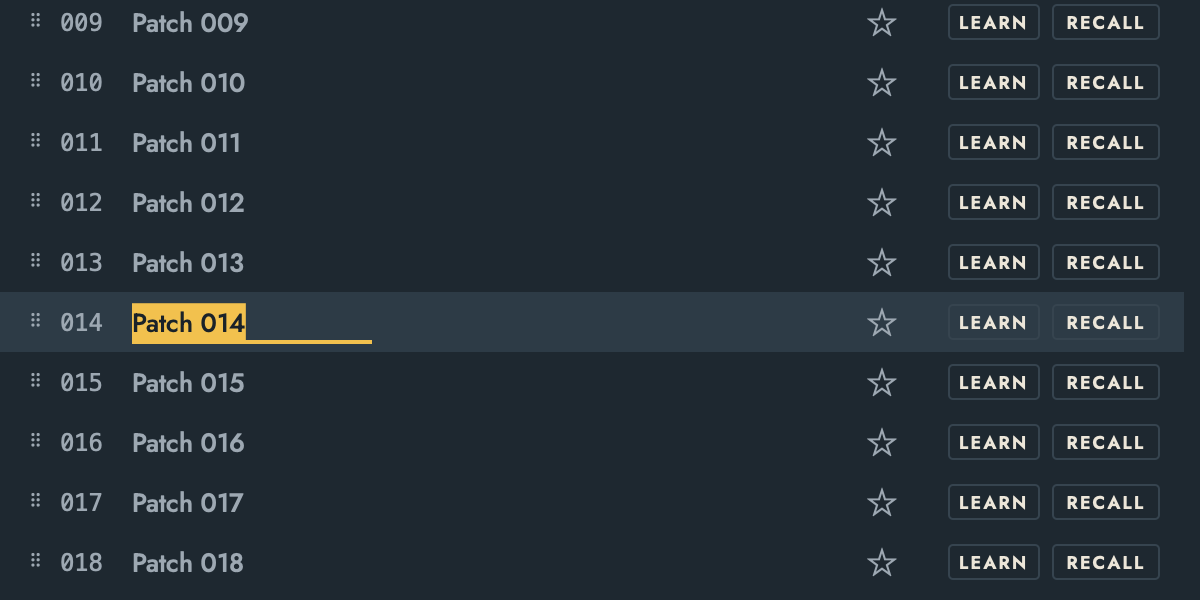
The name becomes editable, with its text selected, so you can type straight over it.
-
Type the new name, then press Return or click anywhere else to save it. Spaces at the start or end of the name are removed.
-
Undo now reads Undo Rename 014 (with your patch's slot number). Each rename is one undo step.
Press Esc while typing to keep the previous name.
An empty name isn't saved
If you press Return with the field empty (or holding only spaces), the field stays open, underlined in red, and a message under the row says A name can't be empty. Press Esc to keep “Patch 014”. Type a name, or press Esc to keep the old one. If you click away from a field that is still empty, the old name is kept.
Edit ▸ Rename works on one patch at a time; with several rows selected it does nothing.
The name is saved with your project when you save it in your DAW (see Data storage).
Renaming on the device too
A rename changes the name in the plugin. On hardware whose template says how its patches are written back (today the Prophet-6's user banks, the Peak's banks A–D, the PCM70's registers R0.0–R4.9, the PCM91's registers R0 and R1, the PCM92's user banks, the JV-1080's User bank, the Korg M1's programs and the Korg Wavestation's RAM and card performances, on the keyboard, the EX, the A/D and the SR, and the Yamaha Motif's User voices and drum kits; see the device's page under Supported devices), the plugin can write the new name into the hardware's memory as well. The Eventide Eclipse renames in the plugin only during the beta: a rename on our own unit once ended in PROGRAM INTEGRITY ERROR, so the plugin doesn't write names to it. After you save the name, a dialog asks: Do you want to rename on your hardware as well?
- It has two answers: Rename on hardware writes the name, Plugin only keeps the rename in the plugin. They are always in the same places, with Rename on hardware gold, so Return gives it. Cancel (or Esc) undoes the rename: the patch gets its old name back, nothing is written and nothing is remembered.
- Tick Don't ask again before you answer to give that answer after every rename without the dialog. Settings ▸ Device ▸ Rename on hardware changes it back: Ask (the default), Always or Never. Your answer is yours, in every project.
- While it works, a dialog shows Renaming 012 on the Sequential Prophet-6 Desktop, with Cancel.
- The Yamaha DX7 can't be sent a stored voice, so you finish the rename on it. The dialog first says what to set on the DX7; Send name loads the voice there and sends it the new name. Then hold STORE and press the voice's key, and click Done. The plugin can't check it or keep a backup; a name you don't store is lost at the next voice.
- Cancel before the write stops it, and a message says Rename on hardware stopped. Nothing was written.
- When the hardware confirms the change, a message says Renamed 012 on the Sequential Prophet-6 Desktop. If the hardware doesn't keep the name or doesn't answer, a notice says what happened and what the hardware holds.
With a saved device: the question comes at Save
When this plugin uses a saved device from My devices and Autosave device configuration is off, a rename asks nothing about the hardware: the bar at the bottom asks whether to save the change to the local device configuration. Click Save there, and once the plugin has saved, the same question follows, about the hardware. After several renames it asks once, listing each patch with its new name, and Rename on hardware writes them one after the other. Cancel there leaves the hardware as it is; the new names stay saved in the plugin. Discard and Duplicate… never write to the hardware and ask nothing about it, and neither does undoing back to what the device holds. With Autosave device configuration on there is no bar, so the question comes at the rename.
The risk, and what protects you
Writing to the hardware changes its memory, and the hardware can't undo that. A wrong write could overwrite a sound. So the plugin takes these steps for every rename on the hardware, and refuses rather than guesses:
- It reads the patch from the hardware first. If the hardware doesn't answer, or the name in its reply can't be read, nothing is written.
- It keeps the patch as a backup before writing, named Before renaming 012, under Library ▸ Device backups…. Restore sends it back if you ever need the patch as it was (SysEx backup and restore). Backup on rename in Device setup decides whether it stays: Ask (the first time, Keep a backup of the program before renaming?, with Don't show again), Keep, or Don't keep, which still makes the backup but deletes it once the rename worked. A rename that fails always keeps it.
- It changes only the name in the patch it read, and sends the whole patch back to the same bank and number.
- It reads the patch back and checks it matches what was sent, byte for byte. If it doesn't, the notice says so and names the backup.
The Korg M1 can't be sent a patch for one number, so it is renamed through its edit buffer, the program it has loaded. The plugin switches it to Program mode and asks it back: if the M1 isn't in Program mode, nothing more is sent. Then it loads the program with a Program Change, reads it, keeps it, sends it back renamed and asks the M1 to write it into the same program. If the plugin already knows the name the M1 holds there and the loaded program has another, nothing is written. With GLOBAL 6, Prog Memory Protect on, the M1 refuses the write and the notice says so. The M1 stays in Program mode afterwards. Its Before renaming 011 backup holds the program as it was, but Restore puts it into the M1's edit buffer, not into program 11: to put it back, restore it, then write it into the program from the M1's panel, as its Owner's Manual describes writing a program.
The Korg Wavestation sends a performance when asked for its number, but a performance sent to it goes into its edit buffer, the performance it is playing, not back into its place. So the plugin first loads the performance, as a recall does, which makes it your current patch. It then reads it, keeps it, sends it back renamed and asks the Wavestation to write it into the same place, and reads it back. Finally it loads it once more, so the display shows the new name. Anything you changed on the Wavestation and didn't write is lost when the performance loads. With Internal Memory Protect on (on the GLOBAL pages), the Wavestation refuses the write and the notice says so. Its Before renaming 011 backup holds the performance as it was, but Restore puts it into the edit buffer, not into its place: to put it back, restore it, then write it from the Wavestation's panel. ROM performances can't be renamed on the unit. The plugin leaves the Wavestation's MIDI mode as you set it.
A Yamaha Motif sends a voice in several parts, with the voice's bank and number first. The plugin takes only the parts of the voice it asked for, never one sent from the panel meanwhile, and writes nothing unless the whole voice came. It changes the name in the part that holds it and sends every part back in order.
A name longer than the hardware keeps, or with a letter the hardware can't show, is refused: the dialog says why, offers Plugin only alone, and the name stays in the plugin only (with Always, a message says so instead). Factory banks that the hardware won't let anyone overwrite (the Prophet-6's banks 5–9) are never written: a rename there shows Plugin only: the Sequential Prophet-6 Desktop can't rename its factory patches, or that line under the question at Save. With Never, nothing is shown. Only one SysEx transfer runs at a time: a rename waits for a backup, a restore or a read to finish.
For many units, renaming follows the hardware's manual and hasn't been tried on a real unit yet: the device's page under Supported devices says which (Beta testing). The first write on your unit is the test: the backup is there if it goes wrong.
Undo (⌘Z) takes back the rename in the plugin only. The hardware keeps the name that was written, and the list then marks the difference (below). To put the old name back on the hardware, rename the patch again and answer Rename on hardware.
Where the hardware and the list disagree
Once the plugin knows what name the hardware holds for a patch, from a rename on the hardware, from Read names from hardware… or from Names… on a backup, a patch whose listed name differs from it shows a small not-equal sign after its name. Point at the mark and the help line says what the hardware has: On the hardware: The Sequential Prophet-6 Desktop still has “Old Pad”. The mark goes when the two agree again: rename the patch on the hardware, or read the names from it. Restoring a backup to the hardware updates what the plugin knows the hardware has, from the names the backup carries. The plugin never guesses: a patch it has never heard the hardware's name for shows no mark.
The hardware keeps its own name
On hardware whose template doesn't say how to write a name back, a rename changes the name in the plugin only, so hardware that shows patch names on its own screen still shows its own name. Batch rename changes names in the plugin only, whatever the hardware: rename a patch on its own to write the name to the hardware.
The first time you rename a patch (one at a time, or with Batch rename) on such hardware, a message says so: This renames the patch in the plugin only. The DX7 will still show its own name. Click OK. Tick Don't show this again if you don't need the reminder; it's remembered for you, in every project.
- Hardware with no name display, such as the Prophet-6 Desktop, never shows the message.
- To see it again, choose Settings ▸ Manage ▸ Show tips again. That brings back every tip you turned off, such as the one before moving patches.
- Which hardware units show names, and which can be renamed over MIDI, is part of their template (see Device templates).
Shortcuts
- Slow double-click a patch's name (click, pause, click): start renaming
- Edit ▸ Rename: start renaming
- Return while typing: save the name
- Esc while typing: keep the previous name
- ⌘Z: undo the rename
This manual is for version 0.9.9.