Manual contents
For version 0.9.9 · beta · Change
Updates
Patchmark tells you when a newer version is out. It can't install it for you: a plugin can't replace itself while your DAW is running. You download the installer, run it with your DAW closed, then reopen your project.
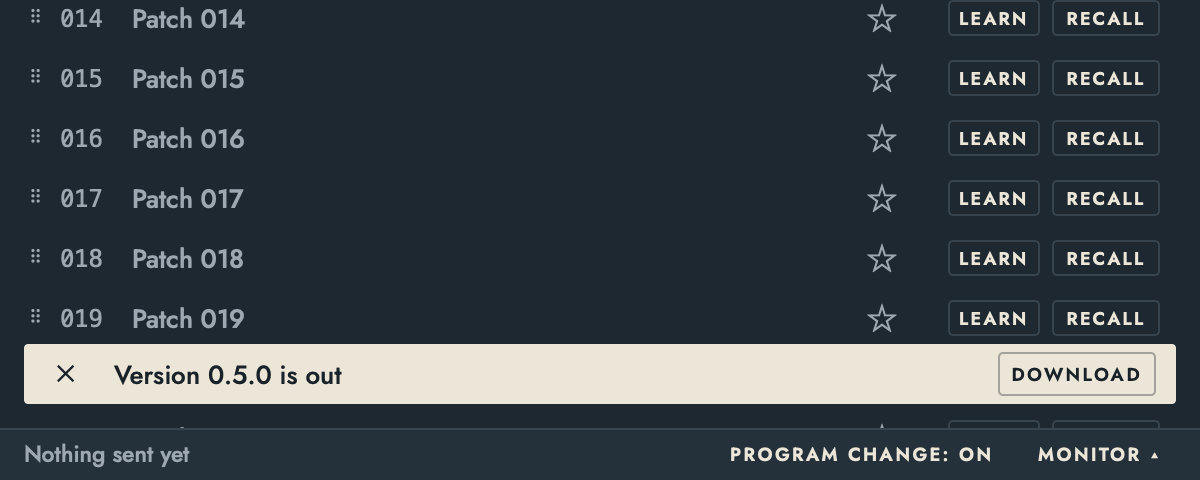
When a newer version is out
Once a day at most, when you open the plugin window, Patchmark asks patchmark.app for the latest version. If there's a newer one:
- A message at the bottom of the window says Version 0.9.1 is out, with Download.
- The ☰ menu at the top right shows New version 0.9.1 available…, and a red dot sits on ☰ until you've looked at it.
☰ ▸ About Patchmark… shows the version you have and its build. With a newer version out, it says so and offers Download; the New version… available… item opens it too. Opening it clears the red dot, and that version isn't announced again, though the menu and the About box still offer it.
Download opens the download in your browser: the Patchmark installer. Quit your DAW, open the installer and follow its steps, as on the Beta testing page. It replaces the version you have, and your library, templates and projects stay as they are. Then reopen your project.
What's new
The first time a plugin window opens after an update, What's new lists what changed, one line per change. If you skipped versions, it lists each one since the version you had. It shows once on your Mac, never after a first install. Full release notes opens the What's new page.
Messages from patchmark.app
The same answer can carry a short message from us: a known issue in your DAW, a fix for a device you use, a page worth reading. The ☰ menu shows it in the same place, with the red dot, and choosing it opens its page in your browser. Then the next one, if there is one, takes its place; a message you've opened doesn't come back. A newer version comes first: once you've looked at it, the message shows.
Some messages are only for one DAW, some versions or the users of one device template. Patchmark picks the ones for you on your Mac, from what it already knows: the website never learns your DAW or your devices.
What is sent
Only the version you have, so the website can say whether there's a newer one. Nothing about you, your Mac, your DAW or your devices, and nothing about the messages. Opening a message is visiting its page on patchmark.app, as any link is. Patchmark checks the answer's signatures and ignores anything that isn't signed by us.
Offline, or if patchmark.app doesn't answer, nothing happens: no message, no error. Patchmark tries again the next day.
Turning it off
Settings ▸ Updates ▸ Check for updates. It's on until you turn it off, and the choice is yours on this Mac, in every project. With it off, Patchmark doesn't ask for new versions, and hides a version or message it found earlier.
Usage statistics
During the beta, Patchmark sends us usage statistics. This is mandatory during the beta period, and Settings ▸ Updates says so. From version 1.0, Settings ▸ Updates ▸ Share anonymous usage statistics is on until you turn it off. While Share debug details is on, it stays on and is shaded: the debug details go with the usage statistics. Turn debug details off first.
Once a day, Patchmark sends one small summary: the plugin version and format, your DAW and macOS, which built-in templates you use, and how often you recall patches and scenes, use MIDI Learn, back up and restore. A template you made or edited counts only as "custom". Never patch names, file paths or MIDI. It carries a random code made for this purpose, never your address. With it off, nothing is sent, and what was counted but not yet sent is deleted at once. The privacy page says what we keep and for how long.
Debug details
During the beta, Patchmark also sends us debug details, so we can reach you about a problem and fix what breaks. This is mandatory during the beta period. Settings ▸ Updates says so; click debug details there to see what's sent.
- Once a day: your beta email address, with the usage statistics' random code, so we can see the usage statistics of the Mac that sent them.
- After a crash that involved Patchmark: the crash report macOS saved. The next time you open Patchmark, it tells you it sent one; Tell us more opens Report a problem with the crash attached. (The AUv3 version can't read macOS's crash reports, so it sends none.)
Never your patch names, MIDI or SysEx data, project names, or anything you type. Through the usage statistics they also choose the warnings in our emails: the ones for your DAW and your templates (Beta testing).
From version 1.0, Share debug details is on until you turn it off, when you first start Patchmark or later in Settings ▸ Updates. The privacy page says what we keep and for how long.
This manual is for version 0.9.9.