Manual contents
For version 0.9.9 · beta · Change
Reordering patches
Drag patches up or down the list to put them in the order you want: sounds you use together next to each other, say, whatever their numbers.
A reorder changes only where a patch is listed. If you drag 012 "Fantasia Pad" to just after 005, it is still 012 "Fantasia Pad", with its ★ and its tags, in the same bank; recalling it still sends program 012. Nothing is sent to the hardware.
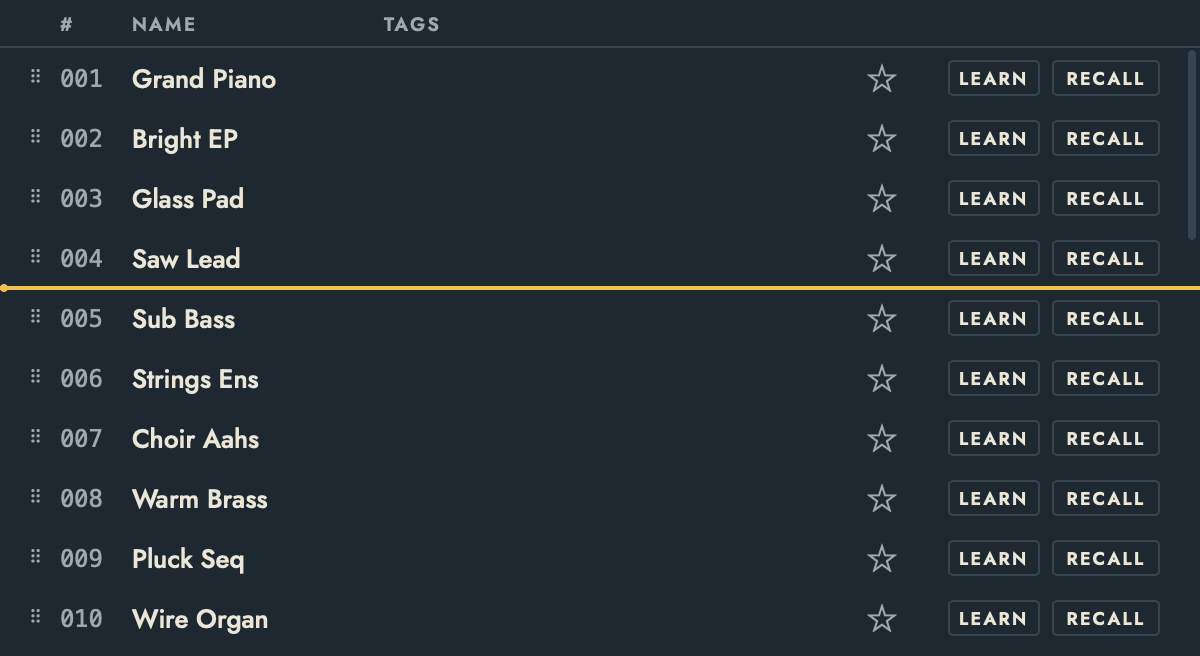
Moving patches
- Press the ⠿ handle at the left of a row and drag. To move several patches, select them first (click, shift-click or ⌘-click), then drag any one of them by its handle: they move together, in the order they're listed, even if they weren't next to each other.
- A gold line shows where they will land. Dropping on the upper half of a row puts them in front of it, on the lower half after it.
- Drag near the top or bottom edge of the list and it scrolls, so you can reach patches that are off screen.
- Let go. The patches are listed where you dropped them.
A message confirms it ("Moved 012 after 005", or "Moved 3 patches to the top") with an Undo button, and the moved patches stay selected where they landed.
What stays the same
- Every patch keeps its number, its name, its ★ favourite and favourite number, its tags and its bank.
- MIDI Learn mappings, scenes, the current patch and the Favourite lane in your DAW all go by number, so a reorder changes none of them.
- Each bank has its own order, and it is saved with your project, a library file and a bank file.
What follows the list's order
- Selecting with shift-click, and the ↑ and ↓ keys.
- Batch rename:
{n}numbers the selected patches in the order they're listed.
Import names, Clear and Copy to still work by number.
Number order
Right-click a patch and choose Number order to list the bank by number again. It only appears once the bank has an order of its own, and it can be undone.
While the list is filtered
Reordering is off while a search or a tag filter hides some patches, because the drop position between the patches shown would be unclear: the ⠿ handles hide, and come back when you clear them.
With only ★ Favourites on, the handles stay: there a drag renumbers your favourites instead of moving patches in the bank (Favourites).
Undo
Each move is one step on Undo, named "Move 012 after 005" (or "Move 3 patches to the top"). One undo puts the list back as it was.
Reordered before 0.8?
Before 0.8, a reorder moved names between numbers, so the names you moved now sit on the numbers you dragged them to. Patchmark can't tell which those were. On hardware that can be read, Library ▸ Read names from hardware… puts the hardware's own names back; otherwise use Import names… or rename them.
This manual is for version 0.9.9.