Manual contents
Getting started
Installing the pluginGetting startedThe patch listPatches
Recalling a patchRenaming a patchFavouritesSearching patchesUndo and redoCopying patches and clearing a rangeBatch renameTagsReordering patchesImporting patch namesYour device
My devicesDevice templatesTemplate filesSupported devicesSwitching banksDisconnecting and reconnectingChoosing the MIDI inputProgram ChangeDevices
Device pagesSongs
The rackSong scenesPatch changes on the timelineSound controlsMIDI in
MIDI LearnMIDI monitorLibrary
Exporting and importing the bankSysEx backup and restoreData storageSet up in your DAW
Logic ProAbleton LiveReaperCubase and NuendoFL StudioStudio OneBitwig StudioHelp
Reporting a problemUpdatesBeta testingWhat's newFor version 0.9.9 · beta · Change
Help
Reporting a problem
☰ ▸ Report a problem… helps you tell us about a bug or ask for a feature, such as a template for your hardware, without a GitHub account.
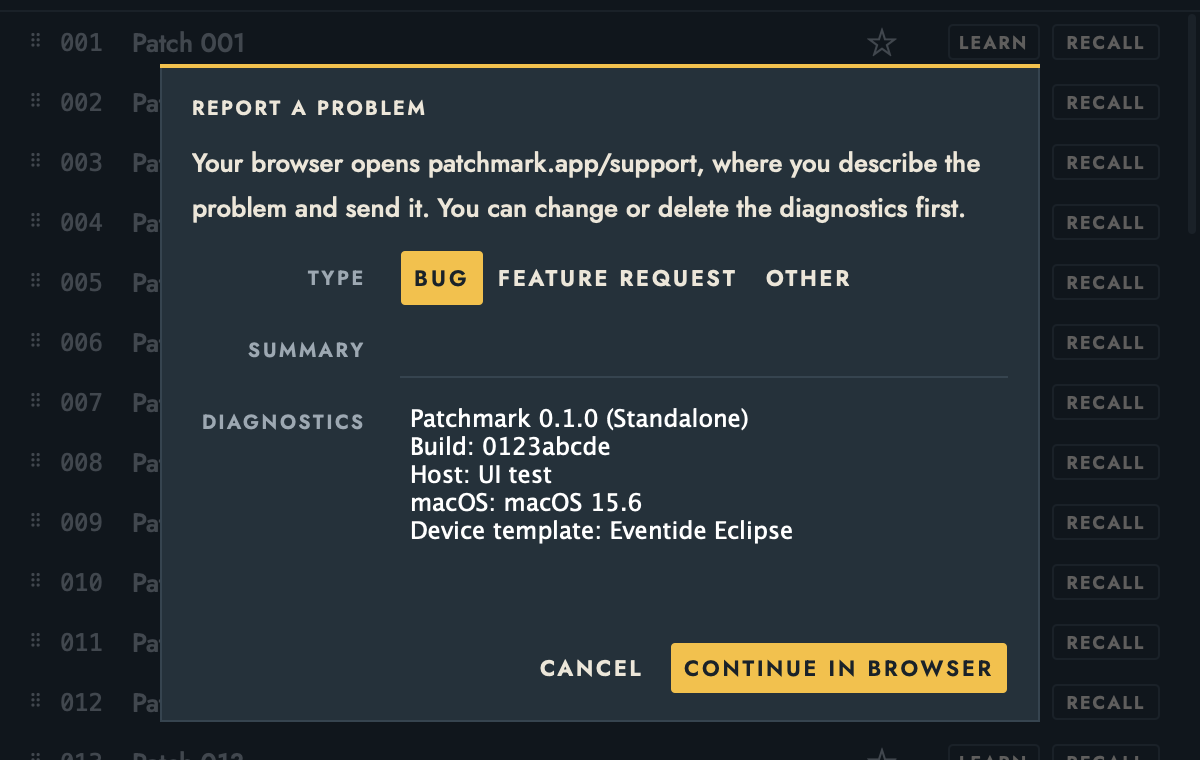
- Choose the type: Bug, Feature request or Other, and write a one-line summary.
- Check the diagnostics. The plugin fills them in: its name, version and format, the host, your Mac's macOS version and the device template you're using. There are no file paths and nothing about you. You can change or delete any of it.
- Click Continue in browser. Your browser opens the support page at patchmark.app with these filled in. Describe the problem there, add your email address if you'd like a reply, and send it.
To send a file, a backup or a MIDI log, email support@patchmark.app instead: the form can't carry one (Send us a dump of your unit).
The plugin itself sends nothing: only the form in your browser does, when you press Send. The privacy policy says what happens to your message.
This manual is for version 0.9.9.