Manual contents
For version 0.9.7 · beta · Change
You're reading the manual for Patchmark 0.9.7. Go to this page for 0.9.9
Switching banks
For hardware with more than one bank, such as the Roland JV-1080 (User, Preset A–D, its cards and expansion boards), the plugin shows every bank's patches in one long list, in bank order. A Bank column says which bank each patch is in. Search, Favourites and Tags look through every bank at once, and recalling a patch sends its own bank, then the patch. The plugin keeps a list of patch names, stars and tags for every bank.
Use banks
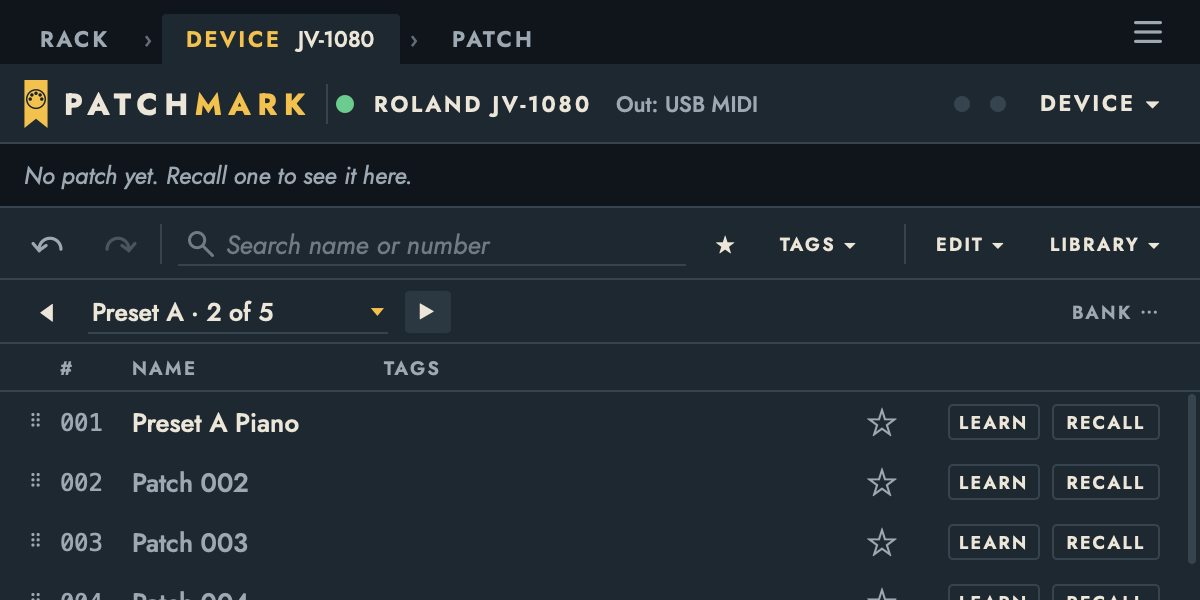
To see one bank at a time instead, open Device, click Edit beside the device, and turn on Use banks, under Bank select. A bank bar then appears under the header, and the list shows the bank you choose in it. The setting belongs to the device, so each of My devices keeps its own. The rest of this page is about the bank bar.
With a single-bank template, such as Generic, there is no Bank column and no bank bar.
Show factory only
Some units put long, mostly empty user banks first. Turn on Factory only, under Use banks in the device's setup, to leave the banks you store your own patches in out of the list, and out of the bank bar. With one bank at a time, a user bank shown moves to the first factory bank. A learned MIDI message still recalls its patch in a user bank.
The switch is greyed out when the device's template doesn't say which banks are factory. A template says it
with each bank's kind (Custom templates).
Hide empty
Hide empty, under Factory only in the device's setup, leaves the empty slots out of the list. It is on until you turn it off, and each device keeps its own. A slot is empty when nobody has named it, the template has no factory name for it, and the hardware has never reported a name for it. Any real name keeps a slot listed, an init patch's too, and so does a star or a tag you gave it. The current patch stays listed even when empty, and Show on the current patch strip lists the patch it shows. The status line counts what is listed, for example 16 of 128 patches.
When every slot in the bank is empty, the list says so: read the names from your hardware, or click Show empty slots, which turns the switch off for this device. Copy, Clear and the other dialogs still take any slot by number.
The switch is greyed out on a template that can't learn names (Generic): there an unnamed slot may well be a patch.
Choosing a bank
- Click the bank's name in the bar, for example User · 1 of 5. The list opens with every bank and its number, the one shown ticked. Pick a bank.
- Or step with ◀ and ▶. They stop at the first and the last bank.
The patch list then shows that bank's patches.
Switching banks sends nothing to the hardware. Recalling a patch does: the plugin sends that patch's bank (Bank Select, as the template specifies), then the Program Change. A learned MIDI message recalls its patch in the bank it was learned in, whichever bank is shown.
What you had set up stays as it was when you switch:
- The selection: patches 003–005 stay selected, now in the new bank.
- The search and Favourites.
- The tag filter. A ticked tag stays ticked even when the new bank has no patch with it. The list is then empty and says why. Untick the tag in Tags ▾, where it is still listed.
Bank ⋯
Bank ⋯, at the right of the bar, acts on the bank shown:
- Rename bank… gives the bank a name of its own, for example "Strings" for Preset A. Leave the field empty to use the template's name again. The name is saved with your project and in an exported library, and you can undo the rename.
- Export this bank… saves the bank's patch names, stars and tags to a file, as Library ▾ ▸ Export bank… does. See Exporting and importing the bank.
- Import into this bank… replaces the bank shown with a bank file. The plugin asks first and says what the file holds. A bank file holds patches only, so the bank keeps its name.
Library ▾ still has Export bank… and Import bank… for the bank shown. With several banks it also has Export library… and Import library… for every bank at once.
This manual is for version 0.9.7.