Manual contents
For version 0.9.7 · beta · Change
You're reading the manual for Patchmark 0.9.7. Go to this page for 0.9.9
Recalling a patch
Recalling a patch switches your hardware to it: a Prophet-6 to a sound, or a PCM70 to a hall program. The patch list marks it as the current patch, and the plugin shows exactly what it sent.
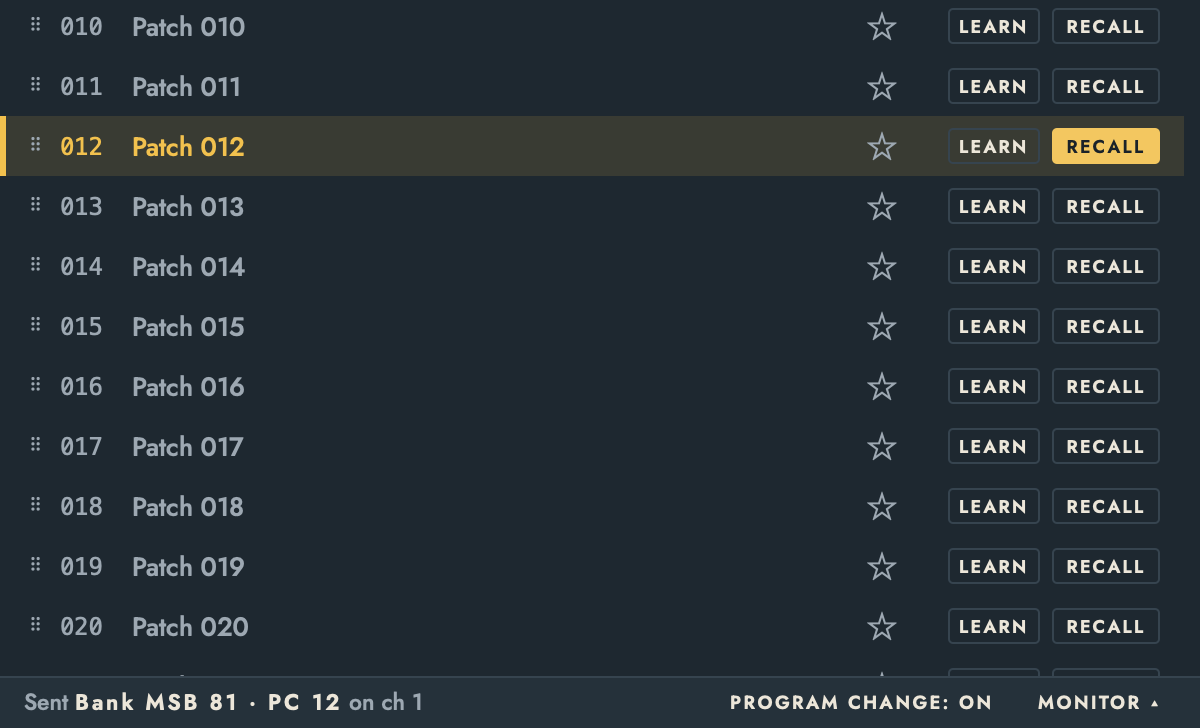
Recall a patch
You can recall a patch in two ways:
- Click Recall on the patch's row
- Double-click the row, on its name, its number or anywhere but its tags (a double-click on the tags opens them; to rename, click the name, pause and click again, see Renaming a patch)
Selecting a row with a click or with ↑ and ↓ sends nothing, so you can browse the list without changing your hardware's patch. Space is your DAW's: with the plugin window in front, it still starts and stops the transport.
You can also recall a patch from your controller with MIDI Learn.
What is sent
The plugin sends the patch's Program Change on the device's MIDI channel. If your device's template uses Bank Select, a bank is sent first, as the template's bank select method says. Which bank depends on the template:
- A template with several banks (the Roland JV-1080: User, Preset A–D): the bank the patch list shows. Each bank brings its own Bank Select values from the template, so recalling 012 while Preset B is shown sends Preset B's values, then PC 12. Device setup has no Bank row for these templates.
- A template with one bank (Generic, and most custom templates): the bank chosen in Device setup ▸ Bank. Choosing such a template starts that row at its bank's values.
| Bank select | Sent for patch 012, bank MSB 81, LSB 0, on channel 1 |
|---|---|
| None | PC 12 |
| MSB | Bank MSB 81 · PC 12 |
| LSB | Bank LSB 0 · PC 12 |
| MSB+LSB | Bank MSB 81 · Bank LSB 0 · PC 12 |
The plugin keeps the bank with the DAW project, so every recall reaches the same bank. Most templates number patches from 001, as on the hardware's front panel, while the Program Change that goes out counts from 0: patch 001 sends Program Change 0.
The current patch
After a recall reaches the hardware:
- the row turns gold, and its Recall button is filled;
- the OUT light in the header flashes;
- the status line at the bottom shows what was sent, for example Sent Bank MSB 81 · PC 12 on ch 1.
The gold row stays gold when you close and reopen the plugin window.
The current patch strip. The dark line between the header and the search field always names the patch the hardware is on, wherever the list is scrolled, whatever the search hides and whichever bank is shown: its bank on hardware with several (D ·), its number in gold, and its name, for example D · 126 SUPERDUPER TEST. Renaming the patch renames it there too. After the name it says how the patch got there when that isn't a plain recall:
- from its front panel: you picked it on the hardware (When you change the patch on the device);
- selected, not sent: Send Program Change is off, so the hardware may be elsewhere;
- last time, not sent since the project opened, faded, with Recall: a reopened project's patch, not confirmed since (When you reopen a project).
While the patch's row is out of sight, Show shows its bank, clears a search or filter that hides it, and scrolls to it. With no current patch, the strip says how to get one. Pointing at the strip names a long name whole in the status line.
Several banks
On a template with several banks, the current patch belongs to its bank: the row is gold only while that bank is shown. Showing another bank sends nothing, and that bank's row 012 is not marked, because the hardware is not on it. The same holds for the faded mark of a reopened project, and the banner's Recall sends the remembered patch in its own bank, whichever bank is shown.
When a recall can't be sent
If the device's port won't open, for example because another app is using it, nothing is marked current, and the row you recalled before stays gold. A red message names the cause, for example Couldn't send: JV-1080 MIDI 1 is in use by another app. Its Device button opens Device setup so you can fix it.
Recall is greyed out until a device is set up, while the output is None, and while the device's port is unplugged (Reconnecting). Double-click does nothing then either.
When you change the patch on the device
If your hardware sends a Program Change when you pick a patch on its front panel, and its MIDI out is connected to the plugin's MIDI input (Device setup ▸ MIDI input), the plugin follows it. That patch's row turns gold as the current one, and it's saved with the project. Nothing is sent back to the hardware.
- A Bank Select the hardware sends first picks the bank, as its template's bank select method says. On hardware that picks its banks by NRPN (the Eventide H3000), the NRPN it sends first does. Without one, the patch is read in the bank of the current patch, or the bank shown.
- If the hardware is in a bank its template doesn't list (or, for a single-bank device, not the bank set in Device setup), the plugin has no names for it, and the gold row stays where it was.
- Only the device's MIDI channel counts. A Program Change you taught to MIDI Learn recalls its patch as usual instead.
- If the faded mark of a reopened project was showing, the hardware has just said where it is, so the mark and the banner go.
To stop following, turn off Settings ▸ Recall ▸ Follow hardware. It's on until you turn it off, for you, in every project. Turn it off if the plugin's MIDI input is a controller keyboard rather than the hardware: its Program Changes would move the gold row without changing the hardware's sound.
When you reopen a project
The plugin saves the current patch with your DAW project. When the project opens, it sends each hardware unit that patch again (its Bank Select and Program Change), as the project loads, with no plugin window open. With several units, one goes at a time, a moment apart. The row turns gold, as after any recall.
Settings ▸ Recall ▸ When a project opens chooses what happens:
- Recall the last patch (the default): as above.
- Do nothing: nothing is sent. The hardware may no longer be on that patch, so the row shows a faded gold mark, and the first time you open the plugin window a banner says JV-1080 was on 012 Fantasia Pad when this project was saved.
- Recall 012 sends that patch again. The row turns gold and the banner goes away.
- ✕ (Dismiss) removes the banner and the faded mark.
The first time you open Patchmark after installing it, it asks which you prefer, with Recall the last patch chosen. Your answer applies to every project, and you can change it in Settings.
One device left alone. In Device ▸ Device setup, turn off On load: Recall the last patch when the project opens for a device that must never be touched when a project opens. It is kept with the project, and that device then behaves as with Do nothing.
When it can't be sent. If the device's output isn't there when the project opens (the interface unplugged, or another app holding it), nothing is lost: the row keeps its faded mark, and the banner says why, for example Couldn't recall 012 Fantasia Pad: the output is unplugged (USB MIDI)., with Recall 012 for when it's back.
The banner appears once. If you close and reopen the window, the faded mark is still there but the banner isn't. Recalling any patch also ends it. Importing a bank clears both the gold and the faded mark, because the names they pointed at are gone.
With Send Program Change off (Settings ▸ Recall), nothing is sent when a project opens: the row keeps its faded mark and the banner offers the patch, as with Do nothing (Program Change).
Shortcuts
| Action | How |
|---|---|
| Recall a patch | Click Recall, or double-click the row's name or number |
| Move the selection without sending | ↑ / ↓ |
This manual is for version 0.9.7.