Manual contents
For version 0.9.7 · beta · Change
You're reading the manual for Patchmark 0.9.7. Go to this page for 0.9.9
The patch list
-
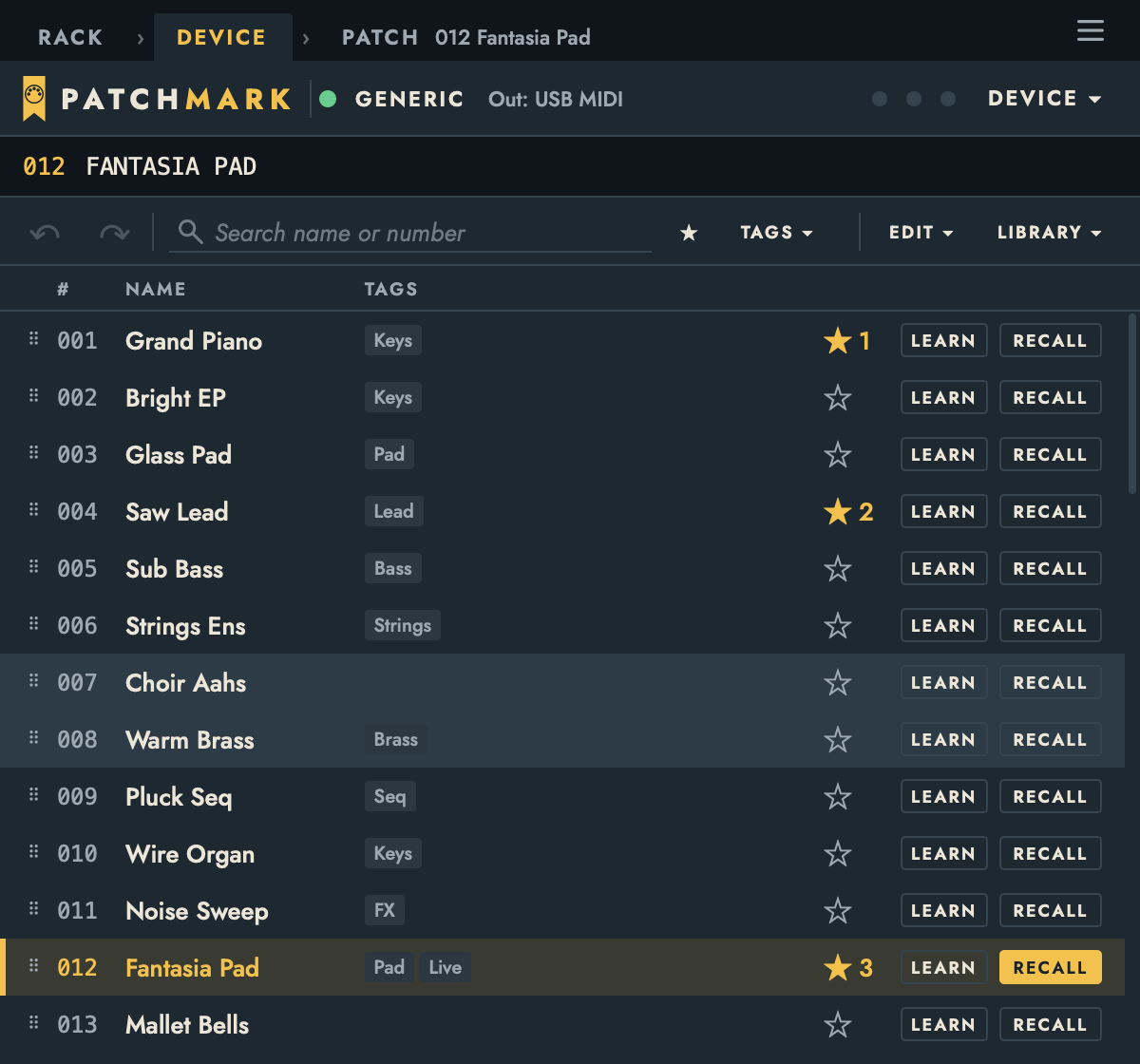
Under a header naming the columns, each row shows, left to right:
- a handle (⠿) to drag the patch to another place in the list (see Reordering patches)
- the patch number: 001-128, or the number the hardware itself shows, such as 451 on an Eclipse or P1.4 on a PCM70 (see Device templates)
- the patch name; a name you never changed (Patch 014, or Patch R0.0 on a PCM70) is shown dimmed. Where the template has a factory name for the patch, that name shows instead, not dimmed, until you rename the patch
- the patch's tags, as small grey chips; double-click them to add or remove tags (see Tags)
- ★: click to star the patch as a favourite (gold when starred, with its favourite number); right-click to choose the number
- Learn: click to teach the patch a MIDI message (see MIDI Learn); it shows the learned message once there is one, such as PC 5
- Recall: sends the patch to the hardware
A double-click on ★, Learn or Recall does the same as one click: it stars, listens or sends once.
-
How a row looks tells you its state:
- Current: the last patch you recalled has a gold bar on its left, a gold slot number and name, and a gold Recall
- Selected: a lighter background
- Listening for MIDI Learn: an orange bar and tint, and the Learn cell orange and blinking
-
The list scrolls through every bank's patches, with a Bank column saying which bank each is in, or through one bank with Use banks on (Switching banks). Show factory only leaves the banks you store your own patches in out (Show factory only), and Hide empty the slots nobody has named (Hide empty). Only the rows on screen are drawn, so it stays quick
-
Below 520 pixels wide the Tags and Learn columns are hidden. Search still finds tags, and MIDI Learn is in the row's right-click menu
Selecting patches
- Click a row to select it, anywhere but ★, Learn and Recall, the name and the tags included; selecting never sends anything to the hardware
- Shift-click selects every row from the last one you selected to the one you click
- ⌘-click adds a row to the selection, or takes it out
- ⌘A selects every row shown; ↑ and ↓ move the selection
- With more than one row selected, the help line says how many (2 selected)
- Your selection stays while you search, as long as the selected patches are still shown
- Right-click a row for the actions that apply to the selection. Right-clicking inside the selection keeps it; right-clicking another row selects that row first. The menu only appears once there is an action in it
- Read name from hardware, last in that menu where the unit can be asked (Reading names from the hardware), asks it for the selected patches alone. Their names go straight in, without the preview: 0.2 is now “Sax Hangar”, as the Lexicon PCM91 has it., with Undo. A patch the unit holds nothing in asks first: keep its name, or Clear name
Shortcuts
- Click a row: select it (sends nothing); ⇧-click and ⌘-click select several
- Double-click the name or the number: recall the patch (Recalling a patch)
- Slow double-click the name (click, pause, click): rename the patch (Renaming a patch)
- Double-click the tags: add or remove tags (Tags)
- ⌘A: select every row shown; ↑ / ↓: move the selection
- Right-click a row: actions for the selection
- ⌘D: copy the selected patch to another slot (Edit ▸ Copy to…)
This manual is for version 0.9.7.