Manual contents
For version 0.9.7 · beta · Change
You're reading the manual for Patchmark 0.9.7. Go to this page for 0.9.9
Batch rename
Rename several patches at once with a pattern, for example to name a run of patches "Live Set 1", "Live Set 2" and so on. Nothing changes until you confirm, and Cancel or Esc leaves everything as it was. Like every rename, it changes only the names the librarian keeps, not the patches stored in the hardware.
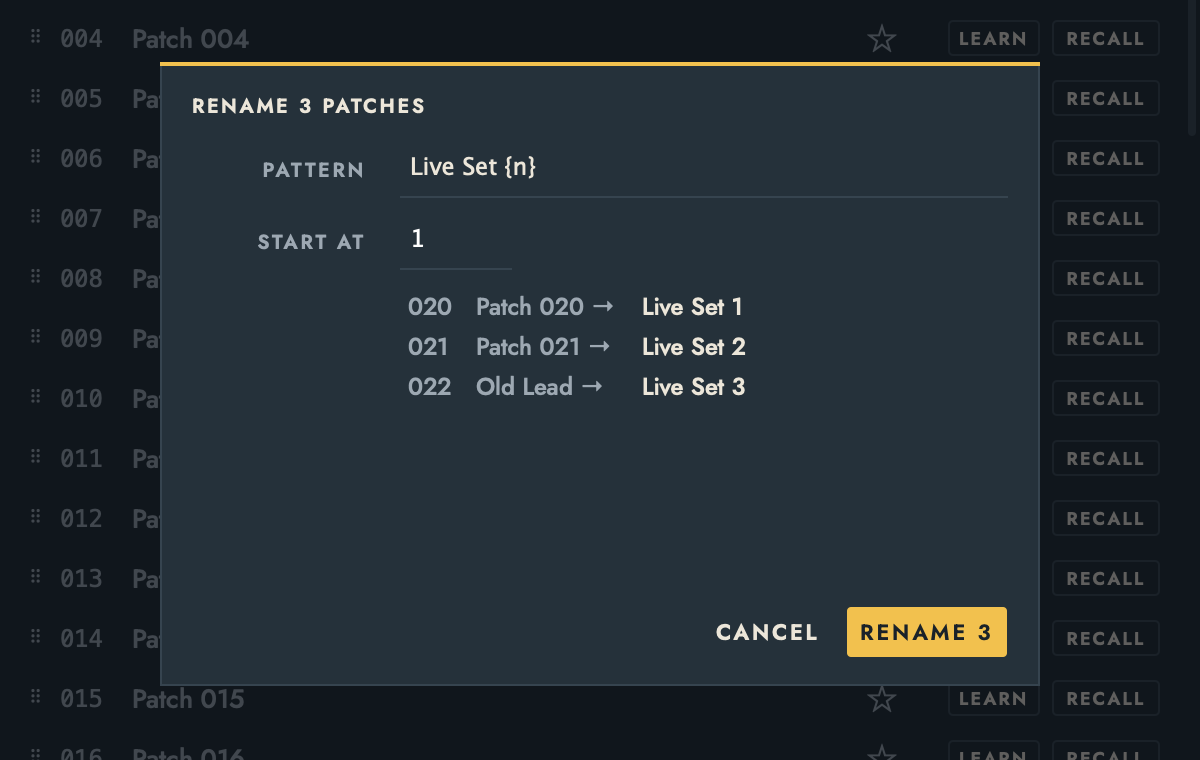
Renaming a selection
-
Select the patches to rename: click the first and shift-click the last, or ⌘-click to pick them one by one. Then choose Edit ▸ Batch rename…, or right-click one of them. With nothing selected, the plugin asks you to select patches first.
-
In Pattern, type the new name. These codes are filled in for each patch:
- {n} is a number that counts up from Start at, one per patch, in the order the list shows them. Type the start with leading zeros to keep them: 01 gives 01, 02 … 10; 1 gives 1, 2 … 10.
- {slot} is the patch's number, as the list shows it (020).
- {name} is the patch's current name, for example {name} (live).
The codes work in capitals too ({N}, {SLOT}, {NAME}). Point at Pattern and the line at the bottom of the window lists them. Anything else you type, braces included, is kept as it is. Spaces at the start and end of a name are left out, as when you rename one patch.
-
The list under the fields shows every selected patch with its current name and the name it will get, and it follows each key you press. The button reads Rename 3 (the number of patches).
-
Click it. A message confirms it ("Renamed 3 patches") with an Undo button.
If the pattern is empty, every name would be blank: a red line says so and the button is greyed out. Start at takes a whole number of up to four digits.
Undoing a batch
The whole batch is one step: one Undo (the message's button, Undo or ⌘Z) puts every name back. The step is named after the patches whose names changed, for example Undo Rename 3 patches. A patch whose name stays the same is left out of it.
With search or Favourites on, only the patches the list shows can be selected, so only those are renamed.
With a device template that has fewer patches (a DX7 has 001–032), only the patches it shows can be renamed.
This manual is for version 0.9.7.