Manual contents
For version 0.9.7 · beta · Change
You're reading the manual for Patchmark 0.9.7. Go to this page for 0.9.9
Copying patches and clearing a range
Both are in the Edit ▾ menu and in the menu you get by right-clicking a patch. Nothing changes until you confirm, and Cancel or Esc leaves everything as it was.
Both copying and clearing change only what the librarian keeps: names, stars, tags and MIDI Learn mappings. The patches stored in the hardware's memory are not touched.
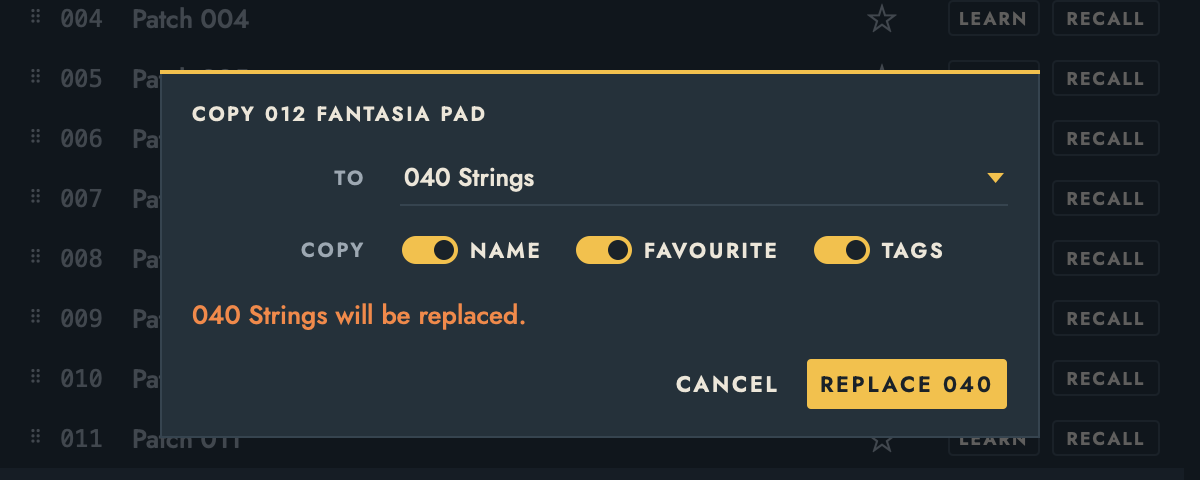
Copying a patch
- Select the patch to copy, then choose Edit ▸ Copy to… (or press ⌘D, or right-click the patch). Copy works on one patch: with none or several selected, the plugin asks you to select one.
- In the dialog, choose the destination under To. The list shows each patch's number and real name, and only the patches your device template has. It starts on the first unnamed patch after the one you copy.
- Under Copy, choose what to take: Name, Favourite and Tags. All three are on to start with; with all three off, the button is greyed out.
- If the destination already has a name and you are copying the name, an amber line says it will be replaced (for example 040 Strings will be replaced.), and the button reads Replace 040. Otherwise it reads Copy to 040.
- Click the button. A message confirms it ("Copied 012 → 040") with an Undo button, and the list selects the copy and scrolls to it.
Clearing a range
- Select the patches to clear (click the first, shift-click the last), then choose Edit ▸ Clear… or right-click. The dialog starts on the first and last selected patch.
- Adjust From and To if needed. If To comes before From, a red line says so and the button is greyed out.
- Under Also clear, choose what goes besides the names. Favourites and Tags are on to start with; MIDI Learn mappings is off.
- Click Clear 16 patches…. A second dialog asks you to confirm. It says how many of those patches have names and what will be reset, for example "11 of them have names. Names, favourites and tags are reset. You can undo this."
- Click Clear. The names go back to "Patch 033" and so on. A message confirms it ("Cleared 033–048") with an Undo button.
To reset the whole bank, select every patch (⌘A) and clear it, ticking MIDI Learn mappings if you
want those gone too. To make new instances start from default names, delete the Patchmark library
folder (see Where your data is kept).
Undo
Each copy and each clear is one step on Undo, named "Copy 012 to 040" or "Clear 033–048". One undo restores everything that step changed, including the MIDI Learn mappings.
This manual is for version 0.9.7.